JavaScript: Microbenchmarks and their pitfalls - trig, random numbers, sqrt, and lookups
In the midst of all the depressing news about coronavirus what better way to cheer everybody up than with a post about JavaScript microbenchmarks. That’ll never start a flamewar, will it? But whilst I was doing some work on arcade.ly recently I thought it was worth revisiting my decision to go with lookup tables for trig functions and the like, and see if perhaps I shouldn’t instead be using functions provided by JavaScript’s global Math object instead.
Before we get into it, let’s get this out of the way: I know microbenchmarks are fraught with pitfalls. It’s super-easy to write a microbenchmark, particularly if a tight loop is involved, that any half-competent compiler or JIT will be able to optimise away to pretty much nothing, and thereby end up with incredibly skewed results.
Other people know this as well. Here’s a comment on a recent Hacker News discussion about an article that claimed "JITs are un-ergonomic":
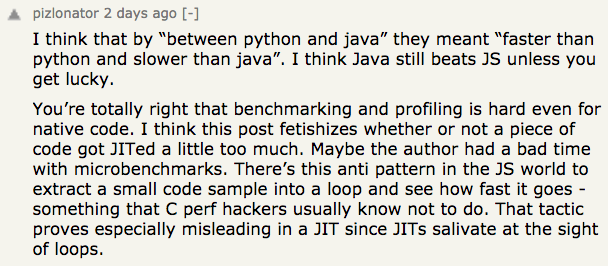
Absolutely spot on: as pizlonator says, the antipattern is real. A few years back I read a blog post - that I wish I could still find find - that covers a similar topic as it relates to C++.
So why am I bothering to write this?
Well, because I suppose my position is that as with many things in software development and life, it’s not so simple.
A few years ago, when I first started working on arcade.ly, I made the decision to use lookup tables for common trig functions (sine, cosine, tangent), along with square roots, rather than use the built-in Math.sin(), Math.cos(), Math.tan() and Math.sqrt() functions.
(N.B., I also avoided `Math.transform()`, but I think that one's worthy of another post because this one is already going to be quite long enough!)
This made sense at the time (2015) because, back then, JavaScript performance across the different browsers and platforms varied wildly.
Chrome’s V8 engine absolutely whupped Firefox’s JS runtime (I forget the name), holding a steady 60fps for Star Citadel, where Firefox could barely manage 30fps. Safari was also capable of a smooth 60fps, as were both IE11 and Edge.
And in early 2016 when it came to the prototype version of Shoot The Rocks, whilst both IE11 and Edge were capable of running the game at 60fps (unlike Firefox), all browsers other than Chrome and Safari took forever to generate the rotated asteroid bitmaps from their vector definitions when the game started up.
The reasons for these differences go far beyond trig functions (e.g., render performance), but I was searching for any edge I could find to get better performance.
Four years later is this decision justified? Is it faster to use lookup tables? And even if it is, is it enough of a difference to make a difference?
Well, not everybody thinks so, and Darren B didn’t think so all the way back in 2012:
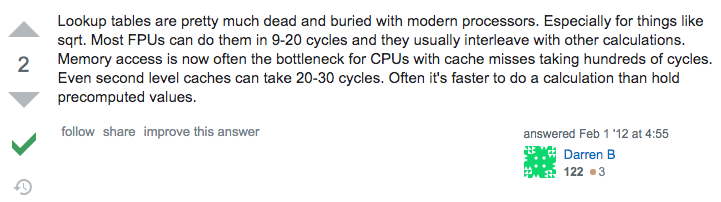
Given the differences in JavaScript performance across browsers in 2012, this was demonstrably incorrect, even though it’s the accepted answer.
Note that there is some credence to the comment about cache misses, which we’ll come back to later. Still, even here, at least for some scenarios - and certainly for JavaScript - the case is overstated.
Some people even claim to have found that pre-computing is slower than using Math.sin() although in at least some cases that’s because of problems with the benchmark they’ve created. See, for example:
https://stackoverflow.com/questions/45896703/why-is-precomputing-sinx-slower-than-using-math-sin-in-javascript.
Let’s get down to business: a naïve microbenchmark
Years ago I had a copy of the 11th Edition of Scott Mueller’s excellent Upgrading and Repairing PCs (TODO: AMAZON AFFILIATE LINK HERE):

I’m not sure exactly what happened to it but I wish I’d kept it because although the hardware is long out of date (published in 1999) the philosophy behind the processes isn’t.
In particular Scott talks extensively about performance figures and specifications, and whilst these are all well and good, he points out that the only way to know how much benefit you’ll gain from a given upgrade is to install it and then measure the performance.
Another way of looking at this is that there is a gap between theory and practice, and this holds as true for software as it does for hardware.
One of the issues that this throws up - as do the comments I highlighted above - is that you need to be careful what it is you’re measuring. Even in this relatively naive example, I want to measure something that reflects the reality of my use case. So let’s look at that:
-
Both Shoot the Rocks and Star Citadel are versions of early vector arcade games: Asteroids and Star Castle, respectively. Such games don’t generally involve bitmap graphics - certainly not in their original incarnations - instead using vectors, which can be freely rotated and scaled, to render objects in the games.
-
Both use trigonometry extensively for:
- Rotating game objects, such as the player’s spaceship, asteroids, and enemies such as the cannon at the centre of the Star Sastle, or the satellites that chase down the player in Asteroids,
- Calculating and adjusting attack trajectories for enemies such as the rotating cannon, flying saucers, satellites, and homing mines,
- Controlling the maximum speed of in game objects such as the player’s spaceship, mines, flying saucers, and satellites,
- Implementing gravity effects for the black hole in Shoot The Rocks (Spacewar! inspired, rather than something from Asteroids),
- Calculating particle trajectories from rocket exhaust and explosions.
-
Because these are simple arcade games rather than simulations, we don’t need a great deal of precision. Still, any self-respecting Asteroids game or Star Castle clone needs to allow objects to rotate relatively smoothly, so we need a decent number of values in our lookup table. I therefore chose to support integer angles in the range 0 - 359 degrees. This is enough for smooth rotation in an arcade game but obviously nowhwere near enough for any kind of simulation or more serious use. Any non-integer values are rounded down to their nearest integer. This is something we apply to all trig operations in both games. You could even reduce precision further by, for example, using a smaller lookup table. For example, you might not need particularly high fidelity rotation and be able to get away with only storing trig function values for every 10 degrees: 0, 10, 20, 30 … 350. This would mean your array lengths would all be 36 which, even at 64-bit precision, only requires 288 bytes to cache values for each trig function. This equates to 3, 5 or 9 cache lines in your processor’s cache, depending on the size of a cache line. We’ll come back to this point later. Suffice to say for my purposes this is too much of a loss of fidelity, because I want some objects to rotate very slowly - but still smoothly - which is impossible with a small number of "stops" around the circle.
-
We don’t use radians because, although mathematically significant, angles expressed in radians with any precision are almost never whole numbers, and therefore do not make good candidates for array lookup indices even in JavaScript where array indices do not need to be integers. This is because modern JavaScript runtimes generally include optimised handling of arrays with integer indices. However, if we were looking at trig functions as a potential new optimisation, as opposed to re-evaluating an optimisation I put in place years ago, we might choose to evaluate the performance of radian angles versus degree angles versus degree angles with lookup tables for
sin,cos, etc.
Actually the original 1979 Asteroids arcade game did *not* rotate the asteroids at all. Asteroids Deluxe, released in 1981, did add rotation but it wasn't particularly smooth. I haven't looked into the arcade code for Asteroids Deluxe enough to know whether it used a set of pre-rotated coordinates to render each rotated frame of the asteroids, or whether it calculated those coordinates on the fly using trig lookup tables. I *can* guarantee an arcade game of this vintage, with a 6502 CPU, would have used lookup tables rather than calculate trig functions on the fly!
So what we’re going to to is benchmark the performance of Math.sin versus a lookup table for every integer degree value around the whole circle. And to ensure we can actually measure elapsed time with some confidence, we’re going to go around the circle 1,000,000 times. In other words, we’re going to do 360,000,000 calculations or lookups, measure the time taken, and use the times to compare the performance.
Here’s the code:
'use strict';

(function (){
    const RADIANS_IN_A_CIRCLE = 2 * Math.PI;
    const ONE_DEGREE = RADIANS_IN_A_CIRCLE / 360;

    let lookup = [];

    for (let index = 0; index < 360; ++index) {
        lookup[index] = Math.sin(index * ONE_DEGREE);
    }

    doOneMillionLookupsAroundWholeCircle();
    doOneMillionLookupsAroundWholeCircle();

    doOneMillionCalculationsAroundWholeCircle();
    doOneMillionCalculationsAroundWholeCircle();

    function doOneMillionLookupsAroundWholeCircle() {
        let start = new Date();
        let result = 0;
        for (
            let count = 0;
            count < 1000000;
            ++count
        ) {
            for (
                let angleDegrees = 0;
                angleDegrees < 360;
                ++angleDegrees
            ) {
                result = result + lookup[angleDegrees];
            }
        }

        let end = new Date();

        let diff = end - start;

        console.log(`Sin lookup (ES2015+) result: ${result}`);
        console.log(`Sin lookup (ES2015+) time: ${diff}`);
    }

    function doOneMillionCalculationsAroundWholeCircle() {
        let start = new Date();
        let result = 0;
        for (
            let count = 0;
            count < 1000000;
            ++count
        ) {
            for (
                let angleDegrees = 0;
                angleDegrees < 360;
                ++angleDegrees
            ) {
                result = result + Math.sin(angleDegrees * ONE_DEGREE);
            }
        }

        let end = new Date();

        let diff = end - start;

        console.log(`Math.sin (ES2015+) result: ${result}`);
        console.log(`Math.sin (ES2015+) time: ${diff}`);
    }
}());
This is pretty easy to run in node or in any web browser, and I’ll provide a link to a web page that does exactly that at the bottom, once we’ve got all our benchmarks in place.
Before we go any further, note the additions on lines 32 and 57. These are present just to ensure that the loops aren’t optimised away to nothing by the runtime.
And here’s the ES5 version of the same code:
'use strict';

(function () {
    var RADIANS_IN_A_CIRCLE = 2 * Math.PI;
    var ONE_DEGREE = RADIANS_IN_A_CIRCLE / 360;

    var lookup = [];

    for (var index = 0; index < 360; ++index) {
        lookup[index] = Math.sin(index * ONE_DEGREE);
    }

    doOneMillionLookupsAroundWholeCircle();
    doOneMillionLookupsAroundWholeCircle();

    doOneMillionCalculationsAroundWholeCircle();
    doOneMillionCalculationsAroundWholeCircle();

    function doOneMillionLookupsAroundWholeCircle() {
        var start = new Date();
        var result = 0;
        for (
            var count = 0;
            count < 1000000;
            ++count
        ) {
            for (
                var angleDegrees = 0;
                angleDegrees < 360;
                ++angleDegrees
            ) {
                result = result + lookup[angleDegrees];
            }
        }

        var end = new Date();

        var diff = end - start;

        console.log(`Sin lookup (ES5) result: ${result}`);
        console.log(`Sin lookup (ES5) time: ${diff}`);
    }

    function doOneMillionCalculationsAroundWholeCircle() {
        var start = new Date();
        var result = 0;
        for (
            var count = 0;
            count < 1000000;
            ++count
        ) {
            for (
                var angleDegrees = 0;
                angleDegrees < 360;
                ++angleDegrees
            ) {
                result = result + Math.sin(angleDegrees * ONE_DEGREE);
            }
        }

        var end = new Date();

        var diff = end - start;

        console.log(`Math.sin (ES5) result: ${result}`);
        console.log(`Math.sin (ES5) time: ${diff}`);
    }
}());
As you can see, the only substantive difference is the use of var rather than let.
The reason I’ve separated ES2015+ and ES5 versions is that when I started collecting measurements I was seeting a significant discrepancy in perforance between the two syntaxes when running in node. In fact the ES2015+ version with let was something like 20x slower than the ES5 version with var when using a lookup table, and 2x slower when calling Math.sin.
I use nvm and so it turned out I was being an idiot: I was running an older version of node and just needed to switch to the latest version (13.12.0 at the time of writing) to fix that discrepancy. Happily browser performance is consistent between both syntaxes as well so there’s little reason not to use the newer syntax.
Still, I decided to include benchmarks for both syntaxes, simply for completeness.
N.B., Note the use of strict mode in both cases. I have found only small, if any, difference between running these benchmarks in strict mode versus running them in "sloppy mode". Where there were differences at all, strict mode tends to be very slightly faster. All my production code for arcade.ly uses strict mode, so for the sake of brevity (ha!), all benchmarks in this post use strict mode.
I’ve also implemented versions of these benchmarks for Math.cos and Math.tan but, to avoid scrolling blindness, I haven’t reproduced the code here. You can find it at:
Math.cosversus lookup (ES2015+): https://gist.github.com/bartread/f1160621a59fc8e2fb97be72a04094a0Math.cosversus lookup (ES5): https://gist.github.com/bartread/69ce0b25bf0e247856cab7a420843deeMath.tanversus lookup (ES2015+): https://gist.github.com/bartread/f72be52be74fafb9feff70560b42b8b5Math.tanversus lookup (ES5): https://gist.github.com/bartread/47135e9f5437259d1df60bcb72262024
And here are the results of all these benchmarks:
| Benchmark | Node.js / ms | Chrome / ms | Firefox / ms | Safari / ms |
|---|---|---|---|---|
| Sin lookup table (ES2015+) | 296 | 321 | 365 | 297 |
| Sin lookup table (ES5) | 294 | 312 | 368 | 296 |
| Math.sin function call (ES2015+) | 5114 | 5576 | 4538 | 3605 |
| Math.sin function call (ES5) | 5163 | 5599 | 4534 | 3833 |
| Cos lookup table (ES2015+) | 293 | 323 | 369 | 297 |
| Cos lookup table (ES5) | 296 | 323 | 375 | 298 |
| Math.cos function call (ES2015+) | 5128 | 5884 | 4577 | 3818 |
| Math.cos function call (ES5) | 5134 | 6302 | 4559 | 4001 |
| Tan lookup table (ES2015+) | 294 | 340 | 364 | 304 |
| Tan lookup table (ES5) | 294 | 336 | 371 | 296 |
| Math.tan function call (ES2015+) | 8103 | 9204 | 5879 | 5358 |
| Math.tan function call (ES5) | 8086 | 9735 | 5912 | 5276 |
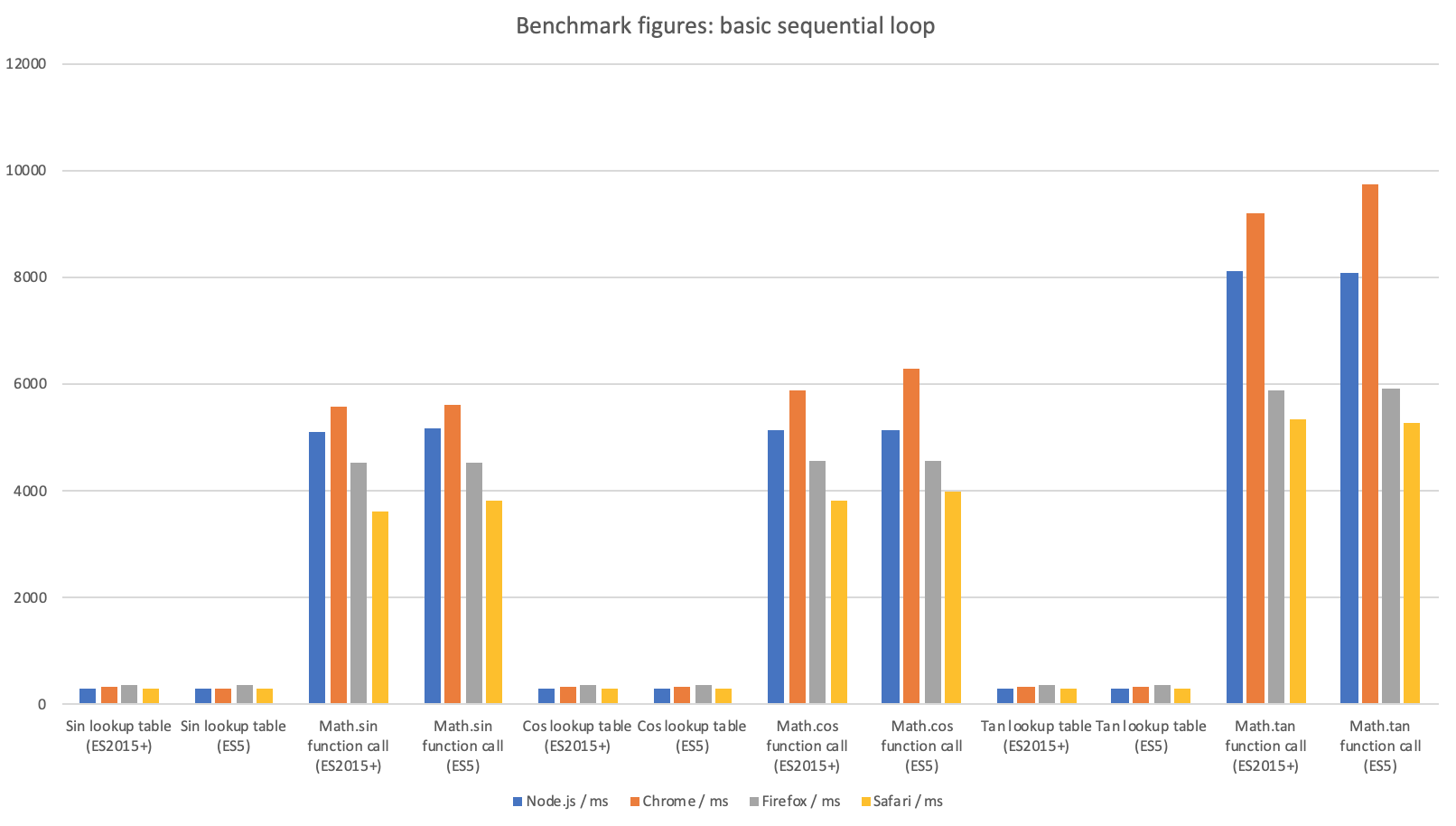
As we can see, depending on the trig operation being performed the lookup beats using the trig function by a factor of 12 - 29x, so lookup tables are the obvious winner, right?
No, not at all.
This benchmark is absolute nonsense: it’s incredibly naïve and deeply flawed. Let’s look at this in more detail.
Unpacking the problems with our naïve microbenchmark
The obvious is that our microbenchmark doesn’t reflect reality of our use case. Let me explain.
It does millions of sequential array lookups, which modern CPUs are very good at optimising. In particular the processor can ensure that any time we need to do the next array lookup the memory we need to read is already in the L1 cache waiting for us so we don’t need to go out to the L2 or L3 caches or, worst of all, main memory when we do our array lookups.
Moreover, our entire array of 360 64-bit floating point numbers in theory takes up less than 3K so the whole thing will easily fit into L1 cache. The memory profiler in Chrome Dev Tools suggests it’s actually a bit more than this: 4.5K, but still nowhere near enough to overflow the cache which, as an example, is 32KB (data) per core on an Intel Core i7.
This means that when we go back around to iterate over the lookup table again (and again, and again), most likely all of it is still sat in the L1 cache, since cache lines are evicted using a least-recently-used algorithm.
So of course this is going to be way faster than the browser trig functions which, after all, have to do actual work.
But our use case is video games, specifically vector arcade games, and this isn’t anything like how we’re going to access our lookup table in our game code.
We have enemies, projectiles, particles, the player’s ship, and all kinds of following and tracking behaviour between these objects all happening in every single frame, 60 times per second. All of these objects and behaviours need trig, either when they spawn, or when they move, or both. There are tons of trig lookups, or calls to trig functions, but not in a sequential fashion. In fact they’re much closer to completely random. This is much harder for the processor to optimise because its caching logic can’t predict which memory locations it will need to pull into cache next.
Now with our small lookup table in isolation that may not matter too much. But, of course, it’s not being used in isolation: plenty of other data will be flying in and out of the cache on each frame:
-
We two trig lookup tables - both sin and cos - not just one of them for every one of our trig calculations,
-
There might be hundreds of live objects on screen at any one time in our games, and data relating to all of them will flow through the cache on every frame,
-
More data relates to the state of the overall game, as well as controlling the behaviour of classes of objects: level, score, lives left, timestamps, metadata used to configure newly created game objects.
It’s therefore highly unlikely that our lookup tables will be able to sit undisturbed in L1 cache: there’s a good chance they’ll be evicted. This will mean cache misses the next time we use them, meaning we’ll need to go out to the L2 or L3 caches, or even perhaps main memory, to get the data we need.
That introduces much more latency.
How much? Well, as an example, here are the figures for Intel Core I7 Xeon 5500 Series processors:
| Data source | Latency (approximate)s |
|---|---|
| L1 cache hit | ~4 cycles |
| L2 cache hit | ~10 cycles |
| L3 cache hit, line unshared | ~40 cycles |
| L3 cache hit, shared line in another core | ~65 cycles |
| L3 cache hit, modified in another core | ~75 cycles |
| Remote L3 cache | ~100 - 300 cycles |
| Local DRAM | ~60ns (~216 cycles on 3.6GHz processor) |
| Remote DRAM | ~100ns (~360 cycles on 3.6GHz processor) |
We’re running single-threaded JavaScript so you’d hope we don’t run into too many issues with shared cache lines or remote L3 caches and DRAM but, still, you can see that the latency escalates significantly at each step as we move out through caches and then into main memory.
For the lookup our benchmark’s tight inner loop is running 360,000,000 times in 290 - 375ms. This means a single iteration runs in 0.8 - 1.04ns. This translates to 3 - 4 CPU clock cycles at 3.6GHz. Looking at the operations being performed (incrementing a count, bounds checking, and adding a value that’s probably in L1 cache to a value that’s probably in a register by the time the JIT has done its magic) I reckon that’s pretty close to as fast as a single CPU core at 3.6GHz can do 360,000,000 lookups and additions without resorting to SIMD instructions, which we don’t have access to in JavaScript. That’s discounting experimental support, of course.
By contrast the function calls for Math.sin and Math.cos bump the time for a single iteration to anywhere from 12.6ns to 17.5ns, or 45 to 63 clock cycles at 3.6GHz. Note that in this case we’re also multiplying our angle by RADIANS_IN_ONE_DEGREE to convert from degrees to radians when we call Math.sin and Math.cos. However this additional multiplication is a 1 cycle operation on modern Intel CPUs, so it will only contribute 100 - 130ms to the total runtime for the function based benchmark.
(Note that in all cases Math.tan cases takes considerably longer but isn’t actually used within any of arcade.ly’s games at present so I’ve only included it for the sake of completeness.)
In neither case are we doing anything realistic, but the lack of reality is such that it unfairly skews the results in favour of the lookup table approach. Based on the discussion above, then, we need to improve our benchmark to take into account the factors we’ve been talking about:
-
The fact that at runtime lookups, and calls to
Math.sinandMath.cos, will occur with non-sequential angles. -
The need that some use cases will have for a larger (quite possibly much larger) lookup table.
-
The likelihood of our lookup table being evicted from L1 cache, and possibly L2 and L3 caches as well.
We’ll deal with (1) first since it’s pretty simple to remedy.
It’s also worth bearing in mind that we’re using quite small lookup tables: 360 values is nowhere near enough where real precision is required. We can only get away with it because we’re talking about arcade games, not a simulation of our solar system (for example). If you want to do something that requires a lot more precision you’re either going to have to use the trig functions, or allocate a much bigger lookup table. How much bigger depends on the precision you need, but think thousands, hundreds of thousands, or even millions of values. What would happen to your performance if you needed a really big lookup table?

Filed Under
Category:Web Dev
Tags:javascript · front-end · gamedev · indiedev · math · asteroids · shoot the rocks · star citadel · star castle · node · nodejs · peformance · microbenchmark · optimisation
I'd love to hear your views.
You can drop me a line, or write your own post and send me a link. Anything interesting I receive I'll add here.